
Open the app on your smartphone or tablet. Tap the + symbol to create a new project.

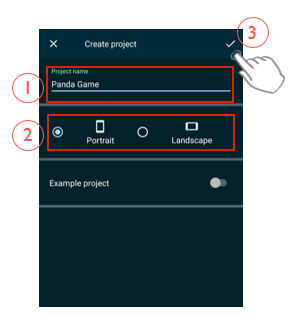
Give the project a name (1) and decide whether you want to create a game in portrait (vertical) or landscape (horizontal) format (2). Then confirm with the checkmark (3).
You are now in your project view. At the top, you see the name of your game.
Below you can see the background – currently, the background is empty. If you want to change it, tap on it.
Under the background, you see the area for your actors and objects that you have added to your game. Currently, the area is still empty.
At the bottom right, you see two important buttons: With the Play button, you start your game.
 With the Plus button, you add a new character/object to your game.

You must be logged in to post a comment.