
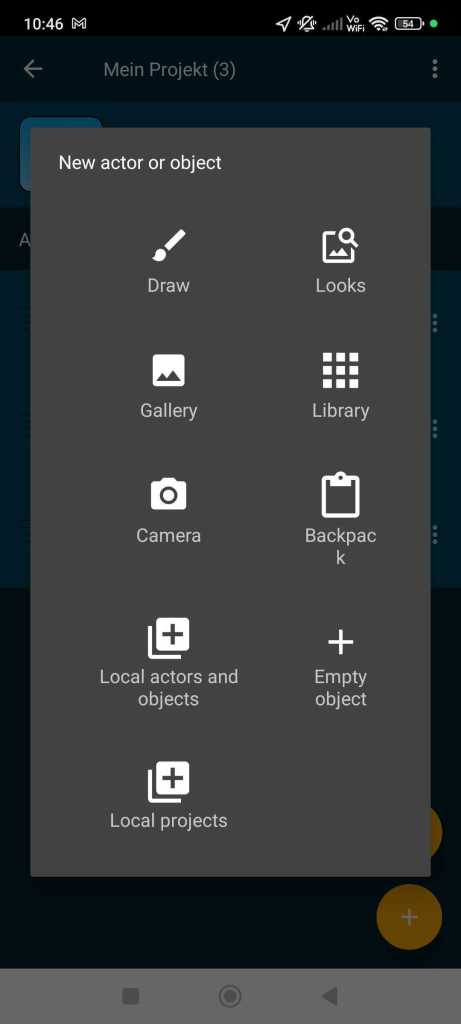
Tap the plus button to add a new figure or object to your project.

In Pocket Code, you can add a character or an object to your project in various ways:
Draw: You can create your own character with Pocket Paint. Pocket Paint is a drawing program (more about Pocket Paint)
Looks: Choose one from a collection of pre-made actors and objects (more about the media library).
Gallery: You can choose an image from your smartphone’s gallery.
Library: In the library, you will find actors and objects that are already programmed, meaning they already have a script. You can select them if you want to use ready-made elements in your game (e.g., a countdown) (more about the library).
Camera: You can use your device’s camera to take a photo and add it as a character.
Backpack: The backpack is currently empty. You can reuse actors or objects that you have stored in your backpack. The entire script will be unpacked with it (more about the backpack).
Local Actors and Objects: Here you will find ready-made characters that you can use in your project. Local actors and objects function like an offline media library, meaning even if you don’t have an internet connection, you can access these actors.
Empty Object: Add an empty object, which is an object that has no appearance. You can program this object normally.
Local Projects: Select a project from which you want to insert the first actor along with the script into your project.
You must be logged in to post a comment.