
In this Tutorial, activating Embroidery Bricks will be explained.

You don’t need any programming knowledge for this. This is the first step to start with the embroidery tutorials. Later, you can design, program, and even embroider your own designs onto your favorite textile piece.
For more information or design suggestions check out the other tutorials.
Here you can download the tutorial in PDF-format:
- Start the “Pocket Code”-App. Follow the clicks!
- Open the menu (dots on the right top).

- Go to “Settings”.
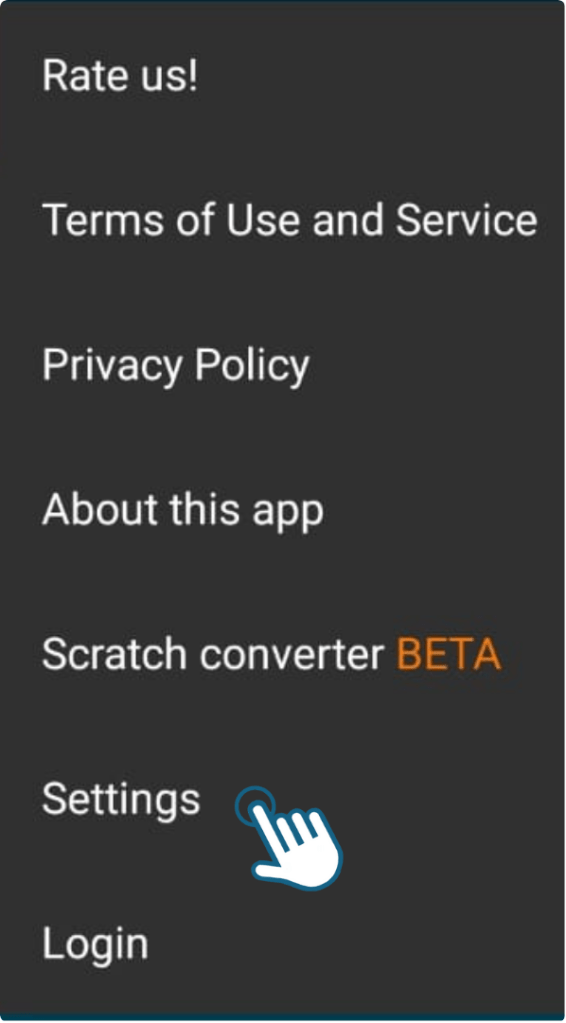
- Select “Embroidery extension”.
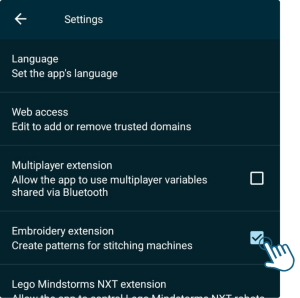
- You will find the Embroidery-Bricks as an own category within your bricks!

Now you will also find all embroidery bricks among the other bricks.
For more information about each brick, feel free to check the documentation of the bricks here or follow the Embroidery-Bricks-tutorial for that.
Now you can get started and create your own designs!
If you need ideas or help with that, check out the other tutorials or continue with the Create Embroidery-Objects-tutorial.
You must be logged in to post a comment.